How to Track HRV with Apple Watch in 2026: A Complete Guide
The Apple Watch is one of the most popular wearables in the world, and it has been tracking heart rate variability since Series 3. But there's a catch: the way Apple collects HRV data by default isn't ideal for serious tracking. In this guide, you'll learn how to get more useful HRV readings from Apple Watch, when a newer model matters, and which apps can help. If you're new to HRV, our beginner's guide covers the fundamentals.
If our HRV interpreter sent you here after an Apple Watch reading, start with the measurement context before buying anything. A random daytime value, an overnight average, and a controlled morning Breathe session can point to different next steps.
Quick Verdict
| Question | Answer |
|---|---|
| Is Apple Watch good enough for HRV? | Yes, if you use consistent overnight readings or controlled morning Breathe sessions and focus on trends. |
| Is it the best dedicated HRV tracker? | No. Oura, WHOOP, and Polar H10 are stronger if HRV is the main goal. |
| Should you buy another device first? | Not if you already own an Apple Watch. Start with a better measurement routine. |
| Best Apple Watch upgrade in 2026 | Apple Watch Series 11 for most iPhone users; Apple Watch Ultra 3 if battery life, ruggedness, and outdoor features matter. |
| Best HRV upgrade path | Add Polar H10 for controlled accuracy checks or move to Oura or WHOOP for passive recovery coaching. |
Apple Watch HRV in 2026: Series 11, SE 3, and Ultra 3
Apple's current Watch lineup includes Series 11, SE 3, and Ultra 3. For HRV, the most important question is not simply which model is newest. It is whether you will wear it consistently overnight, run controlled Breathe sessions when needed, and interpret the same metric over time.
Use this decision rule:
| Situation | Best move |
|---|---|
| You already own Series 8, Series 9, Series 10, or Ultra 2 | Improve your measurement routine before upgrading. |
| You want a current everyday iPhone watch | Choose Apple Watch Series 11. |
| You need longer battery life for sleep plus workouts | Choose Apple Watch Ultra 3 or keep a recent Ultra model. |
| You only care about the cleanest HRV signal | Add Polar H10 or use a sleep-first tracker like Oura or WHOOP. |
| You mainly want a low-cost Apple Watch | SE 3 can work for basic HRV trends, but it is not the strongest HRV-focused pick. |
Upgrading usually will not fix noisy HRV data by itself. If your readings are scattered, standardize timing, posture, and context first.
How Apple Watch Measures HRV
Apple Watch measures HRV using SDNN (standard deviation of normal-to-normal intervals), capturing data primarily during sleep and at random intervals throughout the day. The watch uses its optical heart rate sensor on your wrist to detect beat-to-beat variations. That wrist-based PPG signal is useful, but it is not the same measurement pathway as chest-strap ECG; our ECG vs PPG for HRV guide explains the tradeoff.
Here's how the native HRV tracking works:
- Overnight measurements: Apple Watch takes HRV readings while you sleep, typically during periods of minimal movement
- Daytime snapshots: The watch occasionally measures HRV during the day at seemingly random times
- Mindfulness Breathe sessions: When you use a Breathe session in the Mindfulness app, the watch can capture HRV data for that session
- Data storage: All readings sync to the Health app under "Heart Rate Variability"
The challenge is that Apple's approach is designed for general health monitoring, not for the kind of consistent daily tracking that athletes and biohackers want.
The Accuracy Question: Is Apple Watch HRV Reliable?
Research on Apple Watch HRV accuracy shows mixed results, and the answer depends on how you measure.
What the Studies Say
A 2024 study published in PMC examined the Apple Watch Series 9 and Ultra 2 against the Polar H10 chest strap (the gold standard for consumer HRV measurement). The findings showed that Apple Watch HRV measurements can be accurate when taken under controlled conditions.
The key finding: manually triggered measurements are more accurate than automatic ones. When you sit still and use a Breathe session in the Mindfulness app, the Apple Watch produces more reliable data. The random daytime readings Apple collects automatically are far less consistent.
Marco Altini, creator of HRV4Training and one of the leading experts on consumer HRV tracking, has written extensively about this. His validation research shows that Apple Watch is accurate for manually triggered readings, but the automatically collected data is "subject to changes in a way that makes it hard to interpret."
Why Automatic Readings Are Problematic
Apple's automatic HRV captures have several issues:
- No standardized context: A reading taken while you're walking to lunch isn't comparable to one taken while you're sitting in a meeting
- Movement artifacts: Wrist-based optical sensors are affected by arm movement
- Inconsistent timing: Readings could happen at 9 AM one day and 3 PM the next
- Unknown body position: Sitting, standing, and lying down all affect HRV differently
For meaningful HRV tracking, you need reproducible conditions. Apple's default approach doesn't provide that.
How to Get Accurate HRV Readings on Apple Watch
Here's the protocol for reliable Apple Watch HRV measurement:
The Morning Mindfulness Breathe Method
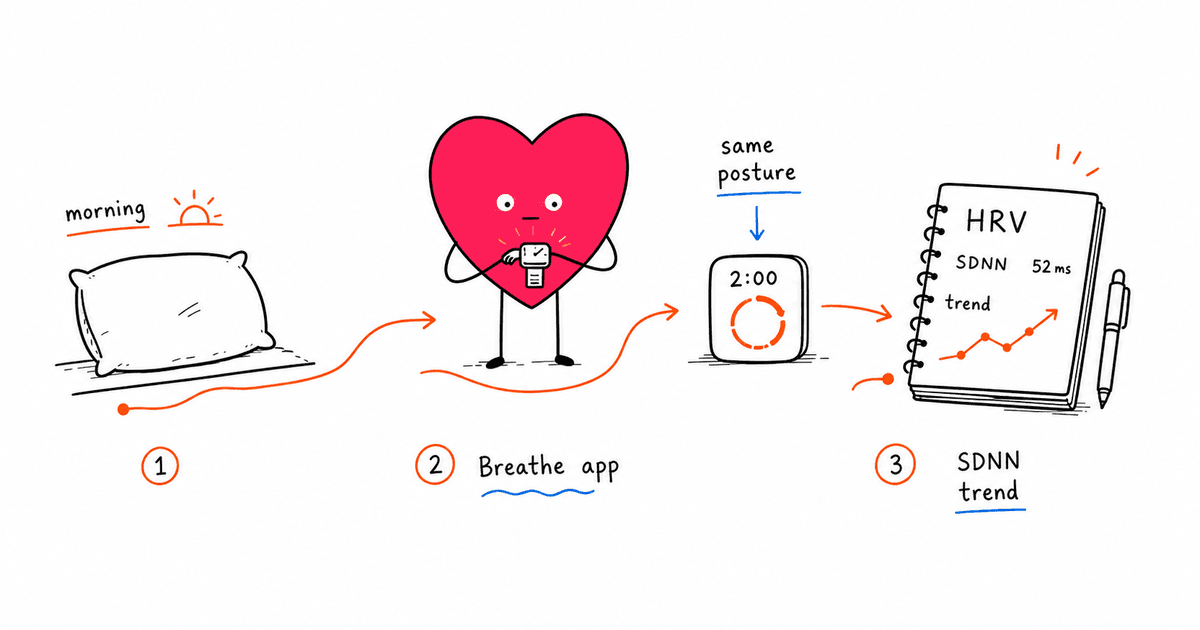
The most accurate approach uses the built-in Mindfulness app under controlled conditions:
- Wake up and stay in bed: Don't check your phone or get up yet
- Open the Mindfulness app on your Apple Watch
- Tap Breathe and set duration to 1 minute (or longer if you prefer)
- Keep your arm still with your wrist at heart level
- Complete the session following the breathing prompts
- Check Health app: Your HRV reading will appear under "Heart Rate Variability"
This gives you a standardized morning reading that's comparable day to day. The key factors are: same time, same body position, minimal stress or stimulation beforehand. For more on how controlled breathing boosts parasympathetic activity, see our guide on breathing exercises and HRV.
Why Morning Readings Matter
HRV experts consistently recommend morning measurements for several reasons:
- Your parasympathetic nervous system is most active after sleep
- You haven't yet been exposed to caffeine, exercise, or daily stressors
- Overnight recovery is reflected in morning HRV
- The conditions are easy to replicate daily
If you can only take one HRV reading per day, make it a controlled morning measurement.
Best Apps for Apple Watch HRV Tracking
While the native Health app stores HRV data, it doesn't provide the analysis tools you need. Here are the top apps for serious HRV tracking:
Athlytic
Athlytic turns your Apple Watch into a recovery and readiness tracker similar to Whoop. It analyzes your HRV, sleep, and training load to provide daily readiness scores.
Pros:
- Clean interface with actionable insights
- Uses Apple Watch data without extra hardware
- Strain tracking for workouts
- Sleep analysis included
Cons:
- Relies on Apple's automatic HRV data (less controlled)
- Subscription required for full features
HRV4Training
HRV4Training is developed by Marco Altini and takes a different approach: it uses your iPhone's camera (finger on the lens) to measure HRV directly, or can take readings via Apple Watch.
Pros:
- Morning measurement protocol built in
- Uses RMSSD metric (more useful than SDNN for daily tracking)
- Extensive research validation
- Training recommendations based on your data
Cons:
- Manual morning measurement required
- Learning curve for the interface
Training Today
Training Today provides simple daily readiness scores based on your Apple Watch HRV data.
Pros:
- Very simple interface
- Accurate readiness predictions according to user reports
- Uses morning HRV from Apple Watch
Cons:
- Limited detailed analysis
- Basic feature set
Welltory
Welltory offers HRV measurement through your iPhone camera plus integration with Apple Watch data.
Pros:
- Multiple measurement options
- Detailed stress and energy analysis
- Integrates with many other apps
Cons:
- Can be overwhelming with data
- Subscription model
Apple Watch vs. Dedicated HRV Devices
How does Apple Watch stack up against devices designed specifically for HRV tracking?
| Feature | Apple Watch | Oura Ring | Whoop | Polar |
|---|---|---|---|---|
| HRV Metric | SDNN | RMSSD | RMSSD | RMSSD |
| Measurement Style | Overnight + Mindfulness Breathe + snapshots | Overnight | Continuous | On-demand + Sleep |
| Requires Phone | For detailed data | For all data | For all data | For sync |
| Chest Strap Option | No | No | No | Yes |
| Battery Life | About 1 day on Series 11, longer on Ultra 3 | 4-7 days | 4-5 days | 5-7 days |
| Multi-Purpose | Very high | Medium | Low | Medium |
When Apple Watch Is Enough
Apple Watch works well for HRV tracking if you:
- Already own one and want to add HRV to your routine
- Are willing to do controlled morning measurements
- Use a dedicated app like HRV4Training
- Don't need the most precise possible data
When to Consider Alternatives
You might want a dedicated device if you:
- Need very accurate overnight HRV trends (consider Oura Ring 4)
- Want 24/7 recovery tracking without manual measurements (consider Whoop 5)
- Are a serious athlete tracking training load (Polar or Garmin offer excellent options)
- Need chest-strap accuracy (the Polar H10 remains the gold standard, and our Polar H10 review explains why)
For most people experimenting with HRV tracking, Apple Watch is a solid starting point, especially if you already own one.
What to Do After an Apple Watch HRV Result
Use your measurement context to pick the next step:
| If your result came from... | Treat it as... | Next step |
|---|---|---|
| Random daytime Apple Watch data | A noisy snapshot | Repeat with a controlled morning Breathe session before changing training or buying a device. |
| Overnight Apple Watch data | A trend signal | Compare it with your 7-day baseline and recent sleep, alcohol, stress, and training context. |
| A controlled morning Breathe session | Your cleanest Apple Watch spot check | Track the same routine for a week, then compare the trend with your subjective recovery. |
| A big drop with symptoms | A reason to pay attention | Do not use HRV to self-diagnose. Consider medical help if symptoms are concerning. |
| Repeated low readings during heavy training | A training-load signal | Consider easier training, better sleep, or an accuracy check with Polar H10. |
If you need help translating a number into context, use the HRV interpreter with Apple Watch selected as your device. If you want a structured reset after a noisy week, the 30-day HRV reset gives you a baseline-building plan.
Understanding Your Apple Watch HRV Data
Once you're collecting data, here's how to interpret it:
What SDNN Means
Apple Watch reports HRV as SDNN (standard deviation of NN intervals). This metric captures overall variability in your heart rhythm. Higher numbers generally indicate better recovery and parasympathetic activity.
Typical ranges:
- Under 50 ms: Lower HRV (may indicate stress, poor recovery, or underlying health issues)
- 50-100 ms: Average range for most adults
- Over 100 ms: Higher HRV (typically seen in fit, younger individuals)
These are rough guidelines. What matters most is your personal baseline and trends over time. For a deeper dive, see our guide on understanding your HRV numbers.
Why Your Numbers Fluctuate
Daily HRV variation is normal. Factors that affect your readings include:
- Sleep quality and duration: Poor sleep typically lowers HRV
- Alcohol: Even moderate drinking can reduce HRV for 24-72 hours (see our alcohol and HRV guide)
- Training load: Hard workouts temporarily decrease HRV during recovery (learn to recognize overtraining through HRV)
- Stress: Psychological stress activates your sympathetic nervous system
- Illness: Your HRV often drops before you notice symptoms
- Caffeine: Effects vary by individual (see our caffeine and HRV guide)
Don't panic over single low readings. Look at your 7-day rolling average for meaningful trends.
Red Flags to Watch For
Contact your healthcare provider if you notice:
- Consistently declining HRV over weeks without explanation
- Very low HRV combined with symptoms like fatigue, dizziness, or chest discomfort
- Sudden drops that don't recover within a few days
HRV is a general indicator of autonomic function, not a diagnostic tool. Use it as one data point among many.
Setting Up a Daily HRV Routine
Here's a practical routine for tracking HRV with Apple Watch:
Daily Protocol
- Wake up: Don't check your phone
- Open Mindfulness: Complete a 1-minute Breathe session while still in bed
- Log any notes: Alcohol last night? Poor sleep? Coming down with something?
- Check your app: Review your HRV trend in Athlytic, HRV4Training, or your preferred app
- Adjust your day: If HRV is unusually low, consider easier training or extra recovery
Weekly Review
Once a week, look at your data holistically:
- What was your average HRV this week vs. last week?
- Did any specific behaviors (late nights, alcohol, hard training) correlate with lower readings?
- Is your overall trend improving, declining, or stable?
This feedback loop helps you understand what affects your nervous system and make better choices. If your trend is declining, our guide on how to improve HRV covers evidence-based strategies. Practices like meditation and better sleep habits often show results within weeks.
Troubleshooting Common Issues
"My HRV data seems all over the place"
This usually means you're looking at Apple's automatic readings. Switch to controlled morning measurements using a Breathe session in the Mindfulness app for more consistent data.
"My Apple Watch HRV is different from my Oura/Whoop"
Different devices use different metrics (SDNN vs. RMSSD), measurement times, and algorithms. Don't compare raw numbers across devices. Track trends within each device instead.
"My HRV is always low compared to online ranges"
Age, fitness level, and genetics all affect HRV. Some people naturally have lower HRV. Our guide on HRV by age shows typical ranges across different age groups. Focus on your personal baseline and relative changes, not absolute numbers.
"The Mindfulness Breathe session doesn't seem to record HRV"
Make sure your Apple Watch is snug (not too tight, not too loose), and keep your arm still during the Mindfulness Breathe session. Check that Health app permissions are enabled for HRV tracking.
Upgrading Your Setup
If you're serious about HRV tracking and find Apple Watch limiting, consider these options:
Add a Chest Strap
For the most accurate readings, use a Polar H10 or Garmin HRM-600 chest strap. These connect to your phone or a compatible app and provide ECG-level accuracy for HRV.
Dedicated HRV Device
If you want passive overnight tracking without manual morning readings, the Oura Ring 4 or Whoop 5 are excellent options. Both focus on recovery metrics and don't require daily effort.
Upgrade Your Apple Watch
If you're on an older Apple Watch model, Apple Watch Series 11 is the mainstream upgrade and Apple Watch Ultra 3 is the better choice if you want longer battery life, outdoor durability, and more room for sleep tracking plus workouts. The HRV measurement method is still wrist-based PPG, so do not upgrade only because one week of HRV readings looked messy.
The Bottom Line
Apple Watch can be an effective HRV tracking tool if you use it correctly. The key is moving beyond Apple's default random measurements to a controlled morning protocol. Use a Mindfulness Breathe session each morning under consistent conditions, pair it with a dedicated analysis app, and focus on trends rather than single readings.
For casual health monitoring, this approach works well. For serious athletes or those wanting the most accurate possible data, consider adding a chest strap for morning measurements or switching to a device designed specifically for recovery tracking. See our best HRV monitors of 2026 guide for a full comparison of your options.
Frequently Asked Questions
Does Apple Watch measure HRV automatically?
Yes, Apple Watch takes HRV readings automatically during sleep and at random times during the day. However, these automatic readings are less reliable than manually triggered measurements using a Breathe session in the Mindfulness app.
What is a good HRV on Apple Watch?
HRV varies significantly by age and fitness level. Most adults see readings between 20-100 ms. What matters most is your personal baseline and trends, not comparing to others.
How often should I check my HRV?
A single controlled morning measurement is enough for most people. Checking multiple times per day with different conditions will produce confusing, inconsistent data.
Why is my Apple Watch HRV different from my Oura Ring?
Apple Watch uses SDNN while Oura uses RMSSD. They measure different aspects of heart rate variability and shouldn't be directly compared. Track trends within each device separately.
Can Apple Watch detect health problems through HRV?
Apple Watch HRV can show patterns that might indicate stress, poor recovery, or illness, but it's not a diagnostic tool. Significant or concerning changes should be discussed with a healthcare provider.
Ready to improve your health with HRV monitoring?
We've tested and compared the top HRV monitors on the market. Find the right one for you.
See Our Top Picks for 2026